Best Mini PC for Ollama
How to choose a small local AI machine without overbuying, underpowering your setup, or turning the project into a DIY hardware chore.
This guide helps buyers decide whether a generic mini PC, a DIY local AI server, or a preconfigured ShiftClawDock host is the right way to run Ollama locally.
Best Mini PC for Ollama
How to choose a small local AI machine without overbuying, underpowering your setup, or turning the project into a DIY hardware chore.
If you are searching for the best mini PC for Ollama, the real question is usually not "Which box is smallest?" It is "Which machine lets me run local models reliably enough for my workflow without wasting time on trial-and-error setup?" For some buyers, a generic mini PC is enough. For others, the better option is a preconfigured local AI host that is already aligned with Ollama, OpenClaw, and the day-one tasks they actually want to run.
TL;DR
- The best mini PC for Ollama is the one that matches your model size, concurrency, and tolerance for setup work.
- A generic mini PC can work well for experimentation, light prompting, and single-user local workflows.
- A preconfigured system makes more sense when you want a known-good local AI environment instead of piecing hardware and software together yourself.
- If you expect multiple workflows, browser automation, or a more stable team setup, compare dedicated local AI hosts instead of buying only on price.
Who this guide is for
This guide is for buyers who want to run Ollama locally and are trying to decide between a standard mini PC, a DIY local AI server, and a preconfigured mini AI host such as ShiftClawDock.
It is especially relevant if you are an ecommerce operator, technical founder, small team, or local AI enthusiast who wants a machine for private local runtime, repeatable workflows, and a simpler path to getting started.
What makes a mini PC good for Ollama
The best mini PC for Ollama is not defined by marketing labels. It is defined by fit.
You usually want to look at five practical questions.
1. What kind of models do you actually plan to run?
If your goal is to test lightweight local models, summarize documents, or build simple internal assistants, your hardware needs are different from someone trying to run larger local models, multiple background processes, or more demanding multi-step workflows.
Buying a machine for Ollama without being clear on workload is one of the easiest ways to make the wrong purchase. Some people buy too small and hit limits immediately. Others buy far too much machine for a modest single-user setup.
2. How many tasks will run at once?
A solo user asking one prompt at a time has very different needs from a team running local AI plus browser tasks, monitoring flows, or repeated operational routines. Concurrency matters more than many buyers expect.
3. Do you want a project, or do you want a ready-to-run tool?
This is often the deciding factor. A generic mini PC can be cheaper up front, but it may still leave you to validate drivers, tune the environment, test model behavior, and stitch together the rest of your workflow. If you want to spend your time using Ollama instead of building the machine around it, preconfiguration has real value.
4. Do you need private local runtime?
Many buyers look at Ollama because they want more control over data handling, model access, and system behavior. If local runtime is part of the reason you are buying, stability and repeatability matter more than finding the absolute lowest-cost hardware.
5. Will this stay a personal experiment, or become an operational system?
A weekend test machine and a machine your business relies on are not the same purchase. Once the setup is meant to support repeated work, handoff, or team usage, known-good configuration becomes a larger part of the buying decision.
When a generic mini PC is enough
A standard mini PC may be a reasonable Ollama choice if all of the following are true:
- you are comfortable handling setup yourself
- you are testing lighter local AI usage
- you do not mind troubleshooting software and environment issues
- you are not yet standardizing the system for a team
This route often makes sense for tinkerers and early experimenters. If you enjoy configuring your stack and do not mind some iteration, a generic machine can be a valid starting point.
When a preconfigured local AI host makes more sense
The calculation changes when your goal is not just "run Ollama somehow," but "run Ollama in a way that is dependable enough to support real work."
That is where a preconfigured system like ShiftClawDock becomes worth considering. ShiftClawDock is positioned as a dedicated hardware product rather than a hosted service. The value is not only the machine itself, but the fact that it is framed around ready-to-run local AI workflows, OpenClaw and Ollama setup, skill packs, guidance, and optional onboarding.
In practice, this matters when you want less time spent assembling and validating the setup, a cleaner path to local AI adoption, hardware selected around local workflow usage rather than generic office computing, and a machine that can be compared by intended workload instead of raw guesswork.
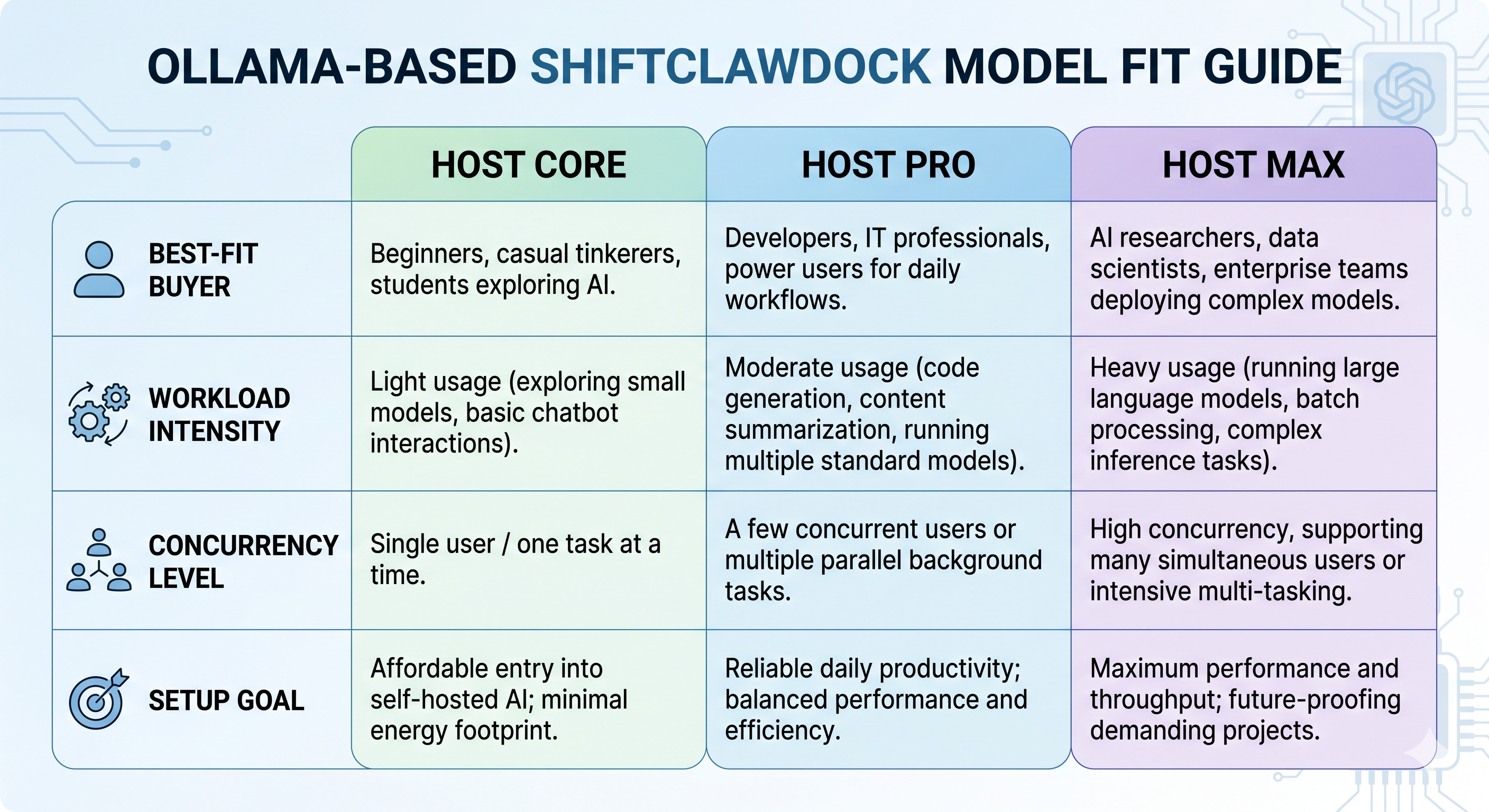
ShiftClawDock model fit at a high level
If you already know you want a dedicated local AI host, the next step is model fit rather than endless feature hunting.
ShiftClawDock Host Core
Host Core is the best fit for buyers who want an entry point for lighter local AI work, smaller experiments, or lower-complexity workflows. If your goal is to get started with Ollama locally and keep the setup straightforward, this is the natural place to begin comparing options.
ShiftClawDock Host Pro
Host Pro is the balanced choice for many serious buyers. It fits teams and operators who want more headroom for multi-step workflows, steadier daily use, and a setup that can support more than one narrow experiment. If you are unsure which way to lean, this is often the most sensible comparison target.
ShiftClawDock Host Max
Host Max is the better fit when you expect heavier concurrency, larger local models, or storage-heavy workflows. It is less about buying the most expensive option and more about avoiding bottlenecks when your local AI usage is clearly beyond entry-level.
You can compare the lineup directly on the product selection page before deciding which model matches your workload: Compare ShiftClawDock Hosts.
Mini PC vs DIY local AI server vs preconfigured host
| Option | Best for | Main advantage | Main tradeoff |
|---|---|---|---|
| Generic mini PC | Experimenters and technical users with time | Lower barrier to initial testing | More setup uncertainty |
| DIY local AI server | Builders who want full control | Maximum customization | More hardware and software overhead |
| Preconfigured local AI host | Buyers who want reliable local AI faster | Less integration friction | Less appealing if you specifically want to build everything yourself |
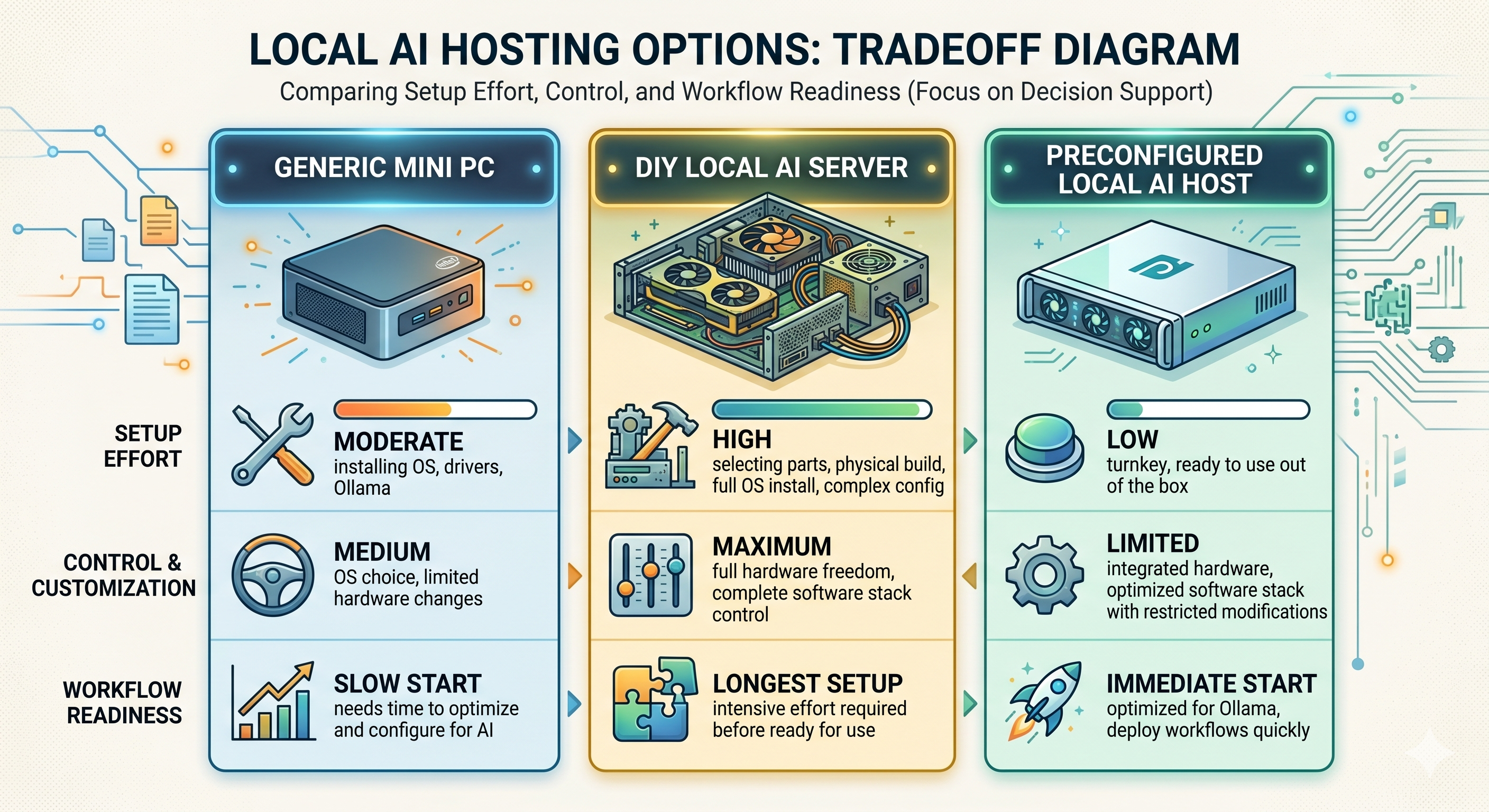
The key is not to romanticize DIY if your real goal is operational use. Many buyers start by thinking they want total control, then realize what they actually want is a machine that lets them run local AI reliably and move on to the work itself.
This may not be for you
If you genuinely enjoy hardware tuning, want to assemble every layer yourself, and treat the setup process as part of the hobby, a preconfigured machine may not be the right answer. The same is true if your Ollama usage will remain very light and experimental for the foreseeable future.
That does not make ShiftClawDock a poor fit in general. It just means the product is more valuable when convenience, repeatability, and workflow readiness are part of the buying criteria.
How to decide without overspending
A simple way to choose the best mini PC for Ollama is to work backward from use case.
Choose a lighter setup if:
- you are learning Ollama
- you will mostly run one task at a time
- you do not need to support a team workflow yet
Choose a more capable local AI host if:
- you expect daily use instead of occasional testing
- you want the machine to support business workflows
- you need cleaner onboarding and less environment friction
- you may expand into OpenClaw, browser automation, or monitoring-related routines
Stay away from purely price-based decisions if:
- you already know your time is more expensive than the hardware savings
- you have been burned by unstable DIY setups before
- you need a machine that other people can also understand and use
Why buyers searching for Ollama often end up comparing workflow fit instead
People rarely stay focused on the phrase "mini PC for Ollama" for very long. Once they understand the options, the question changes into whether they can trust the machine to support local AI work over time, whether it replaces a messy DIY stack, which model gives them enough headroom without wasting budget, and how quickly they can get from unboxing to useful work.
That is why a good buying decision usually includes more than raw hardware curiosity. It includes setup path, workload shape, support expectations, and whether the machine is intended for hobby use or real operations.
If that is where you are in the evaluation process, it helps to look at how the system is positioned end to end, not just how small the chassis is. You can review how the workflow is framed here: How ShiftClawDock Works.
FAQ
Can any mini PC run Ollama?
Some mini PCs can run Ollama for lighter local AI use, but not every machine will be a good fit for the same workloads. The right choice depends on model size, how many tasks you plan to run, and how much setup friction you are willing to absorb.
Is a DIY local AI server always better than a mini PC?
No. DIY can offer more control, but it also adds more integration work. If your goal is faster access to a known-good local AI environment, a preconfigured machine can be the better choice.
Which ShiftClawDock model should most buyers start comparing first?
For many serious buyers, ShiftClawDock Host Pro is the most practical starting point because it balances capability with broader workflow fit. Lighter or heavier needs may push you toward Host Core or Host Max instead.
Is ShiftClawDock a cloud service?
No. ShiftClawDock is positioned as dedicated hardware for local AI workflows, not a hosted SaaS or remote cloud platform.
Next step
If you are narrowing down the best mini PC for Ollama, the most useful next move is usually to compare machines by workload rather than by vague performance promises. Start with the model comparison page, then review the product detail and waitlist if the setup matches what you need.
Ready to get your local AI host preconfigured and shipped?
Frequently Asked Questions
Can any mini PC run Ollama?
Some mini PCs can run Ollama for lighter local AI use, but not every machine will be a good fit for the same workloads. The right choice depends on model size, how many tasks you plan to run, and how much setup friction you are willing to absorb.
Is a DIY local AI server always better than a mini PC?
No. DIY can offer more control, but it also adds more integration work. If your goal is faster access to a known-good local AI environment, a preconfigured machine can be the better choice.
Which ShiftClawDock model should most buyers start comparing first?
For many serious buyers, ShiftClawDock Host Pro is the most practical starting point because it balances capability with broader workflow fit. Lighter or heavier needs may push you toward Host Core or Host Max instead.
Is ShiftClawDock a cloud service?
No. ShiftClawDock is positioned as dedicated hardware for local AI workflows, not a hosted SaaS or remote cloud platform.
Compare Host Models
ShiftClawDock Host ships preconfigured with Ollama, OpenClaw, and skill packs — ready to run on day one.